Features
Bison provides a comprehensive suite of features for GPU resource management, billing, and multi-tenant isolation in Kubernetes environments.
See Bison in Action
Real-Time Resource Dashboard
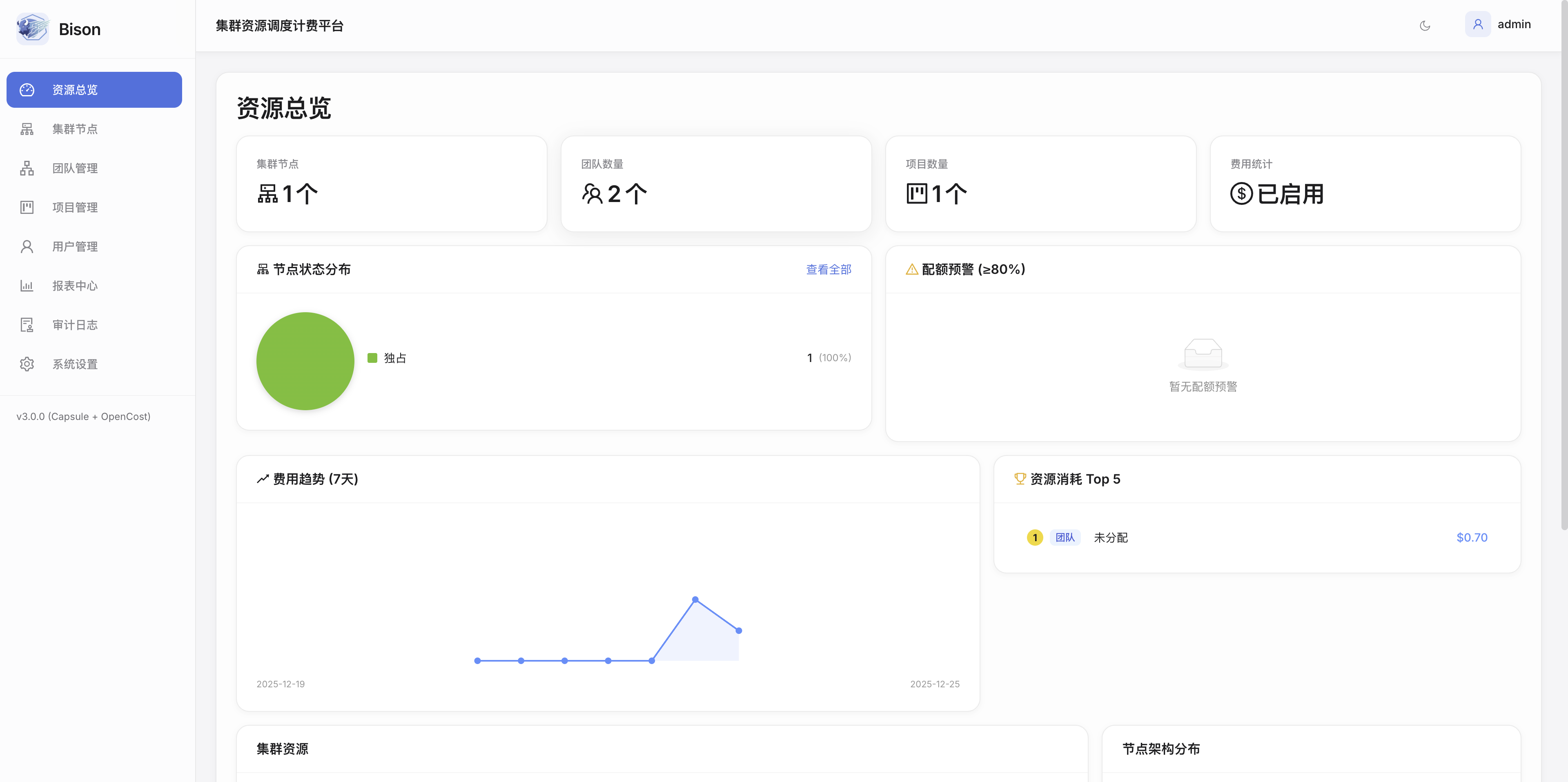
What you see:
- Cluster Overview - Total teams, projects, resource pools, and quotas at a glance
- Resource Utilization - Visual breakdown showing which teams are consuming resources
- 7-Day Cost Trends - Historical cost data to identify spending patterns
- Top 5 Cost Rankings - Quickly identify heavy GPU consumers
- Team Budget Status - Real-time balance monitoring with color-coded alerts
Who benefits:
- Platform Administrators get instant visibility into cluster health and usage patterns
- Finance Teams can track costs in real-time without waiting for monthly reports
- Team Leaders can compare their usage against other teams
Team Management & Budget Monitoring
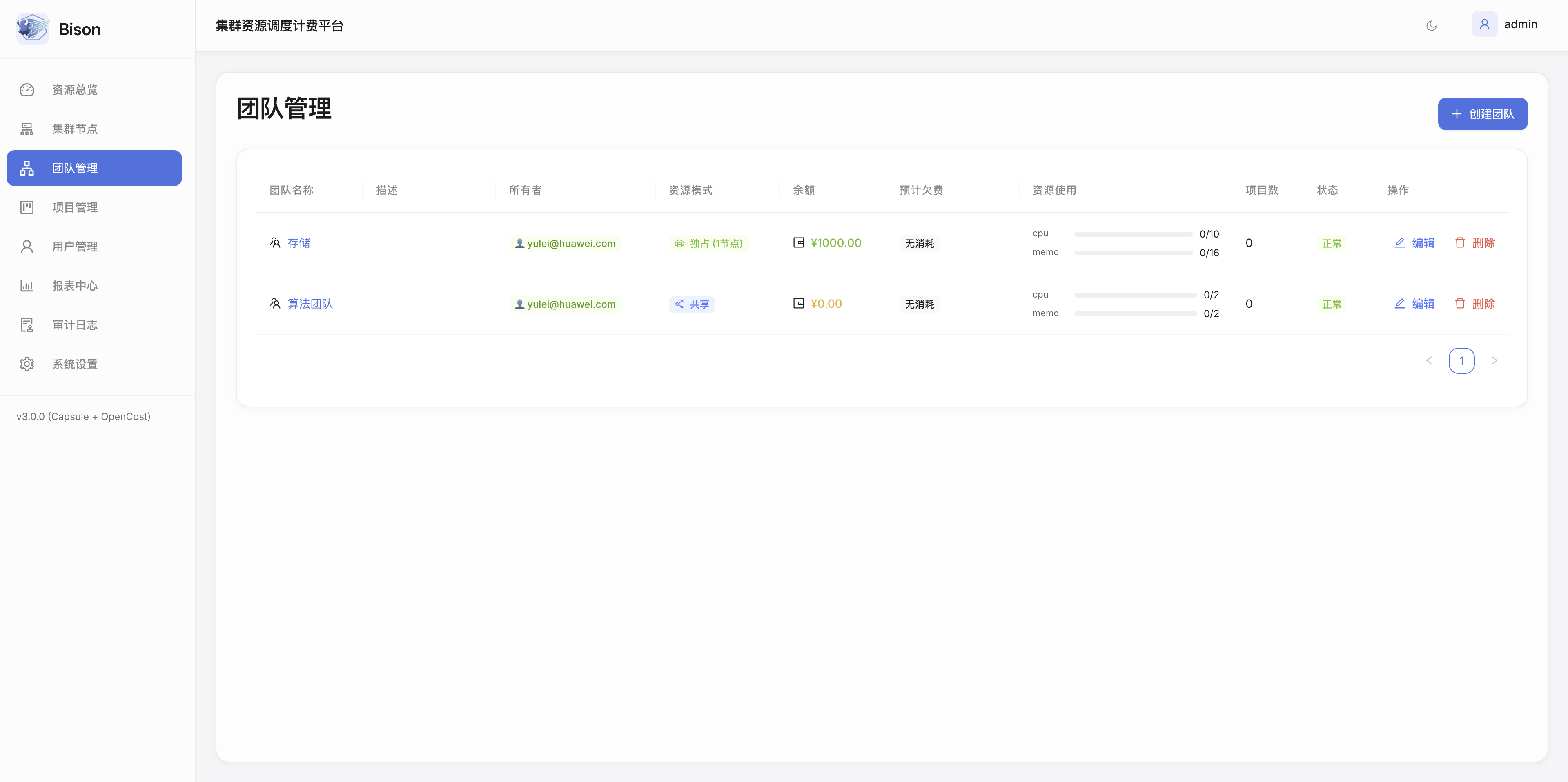
What you see:
- Team List with real-time status indicators:
- Green balance = Healthy budget
- Amber balance = Approaching threshold
- Red balance = Low balance or suspended
- Resource Allocation - CPU/Memory/GPU quotas per team (e.g., "cpu 0/10" means 0 used out of 10 allocated)
- Project Count - Number of namespaces/projects under each team
- Quick Actions - Edit quotas, recharge balance, or delete team with one click
Who benefits:
- Team Leaders monitor their budget status and resource usage at a glance
- Administrators manage multiple teams from a single unified view
- Finance Teams see which teams need recharging
Flexible Billing Configuration
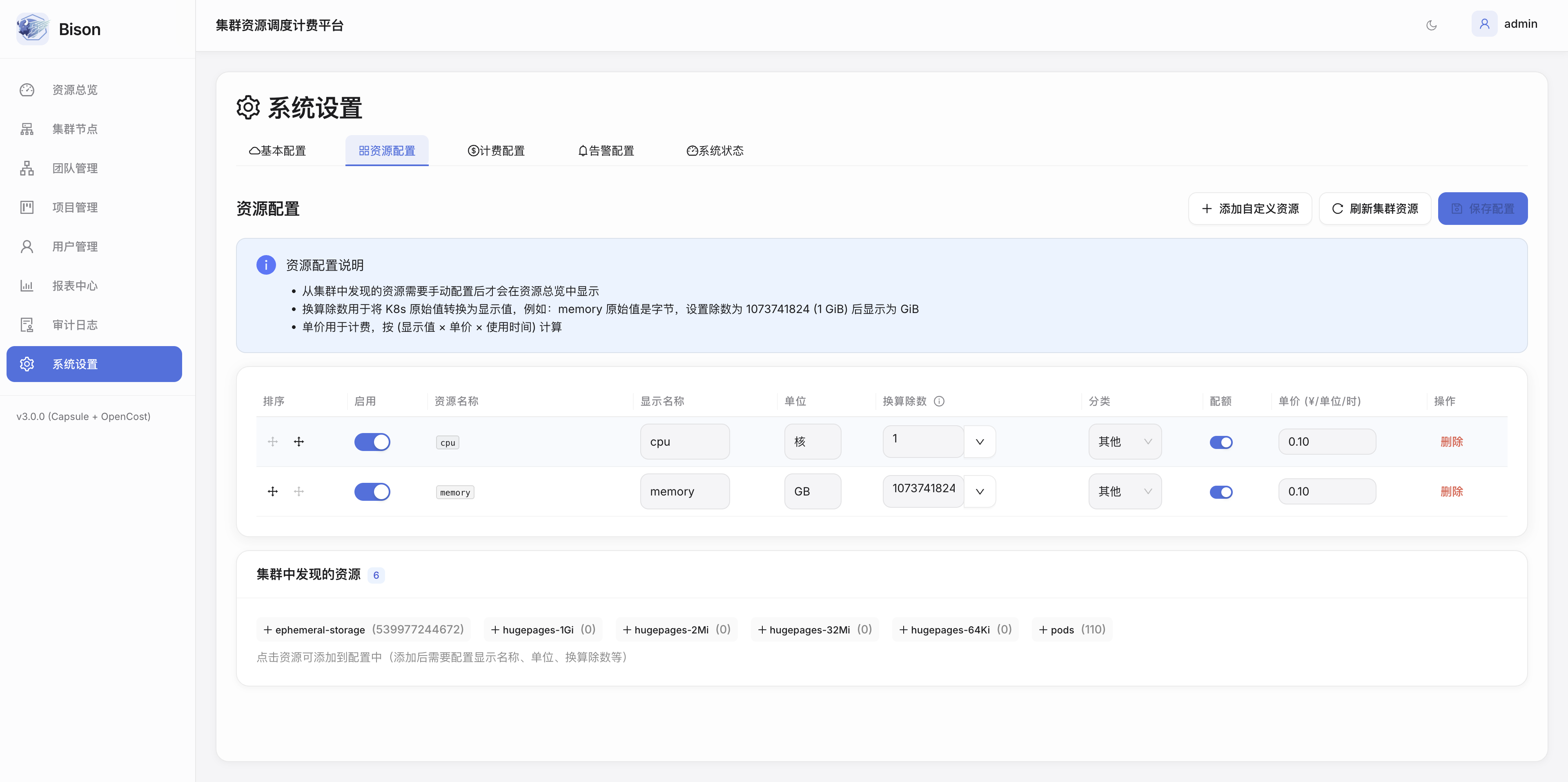
What you see:
- Per-Resource Pricing - Set custom prices for CPU (per core-hour), Memory (per GB-hour), GPU (per GPU-hour)
- Currency Selection - Support for CNY, USD, EUR, and other currencies
- Enable/Disable Toggle - Turn billing on/off for specific resources with one click
- Billing Rules - Define how resources are metered (hourly, daily, etc.)
- Alert Thresholds - Configure when to send low-balance warnings
Who benefits:
- Finance Teams align cloud costs with internal chargeback policies
- Administrators adjust pricing based on actual hardware costs
- Budget Managers set appropriate warning thresholds to prevent overruns
Core Capabilities
Legend — items marked Planned are on the optimization roadmap and not yet implemented. Everything else ships today.
Multi-Tenant Management
- Capsule-Powered Isolation — true multi-tenancy using the Kubernetes-native Capsule operator
- Team-Based Access Control — manage users, roles, and permissions per team
- Shared & Exclusive Node Pools — flexible resource allocation strategies
- Enterprise SSO / OIDC — Planned
Real-Time Billing
- Usage-Based Billing — accurate cost tracking based on actual resource consumption (via OpenCost)
- Configurable Pricing — set custom rates for CPU, Memory, GPU, and any Kubernetes resource
- Multi-Currency Support — configurable currency and symbol (e.g. CNY ¥, USD $)
- Prepaid Balances with Real-Time Deduction — hourly metering with optimistic-concurrency-safe balance writes
Cluster & Node Management
- Node Inventory — live view of every node with architecture, status, and GPU device breakdown
- Node Pool Modes — mark nodes as shared, exclusive, disabled, or unmanaged
- Per-Node Detail — CPU / memory / GPU utilization time series and workload placement
- Resource Discovery — auto-discover cluster resources (CPU, memory, GPU, storage, custom) and configure display units and pricing
Automated Node Onboarding
- Init Script Generation — generate a per-node bootstrap script from the control-plane configuration
- SSH Onboarding Tasks — run onboarding over SSH with live progress tracking
- Control-Plane Configuration — manage how new nodes join the managed pool
Dynamic Resource Quotas
- Per-Team Quotas — CPU, Memory, GPU, Storage, and custom resources
- Namespace Quotas — project-level resource limits within teams
- Auto-Enforcement — Kubernetes-native quota enforcement via Capsule
- Quota Alerts — dashboard warnings when usage approaches limits (≥ 80%)
Team Balance & Wallet System
- Prepaid Balances — team wallets with real-time deduction
- Transaction History — complete audit trail of every recharge and deduction
- Grace Period & Auto-Suspension — configurable grace window before suspending overdue teams
Auto-Recharge
- Scheduled Top-Ups — weekly or monthly automatic recharges
- Custom Amounts — flexible recharge amounts per team
Balance Alerts
- Multi-Channel Notifications — Webhook, DingTalk, WeChat
- Configurable Thresholds — set warning levels (e.g. 20%, 10%, 5%)
- Auto-Suspension — automatically suspend workloads when the grace period expires
- Email / SMTP notifications — Planned
Usage Reports
- Team & Project Analytics — per-team and per-namespace cost breakdowns and trends
- CSV Export — export summary reports for finance reconciliation
- Historical Windows — 7 / 30 / 90-day cost analysis
- Excel & PDF export — Planned
Audit Logging
- Complete Operation History — track administrative actions with pagination
- User Attribution — who did what and when
- Resource Changes — track quota, balance, and configuration changes
Architecture Highlights
Bison's architecture is designed for simplicity, scalability, and zero external dependencies.
Key Architectural Benefits
- Zero External Dependencies - All data stored in Kubernetes ConfigMaps (etcd-backed)
- Cloud-Native - Built on Kubernetes primitives for maximum portability
- Scalable - Stateless API server that can scale horizontally
- Secure - Kubernetes RBAC integration and optional authentication
- Observable - Prometheus metrics and structured logging
- Configurable - custom per-resource pricing, alert thresholds, and grace policy
Integration Points
OpenCost Integration
Bison leverages OpenCost for real-time cost tracking:
- Per-pod, per-namespace, per-team cost visibility
- GPU utilization metrics
- Historical cost data and trends
- Integration with Prometheus for metric collection
Capsule Integration
Bison uses Capsule for multi-tenancy:
- Team-based tenant isolation
- Namespace quota enforcement
- Network and security policies
Prometheus Integration
Metrics collection and monitoring:
- Resource utilization tracking
- Custom billing metrics
- Alert rule evaluation
- Historical data retention
Next Steps
- Installation Guide - Deploy Bison in your cluster
- User Guides - Learn how to use Bison
- Architecture - Deep dive into system design
- Configuration - Configure billing and settings